Linux File Permissions

Welcome to the world of Linux file permissions, a fundamental aspect of managing and securing your system's files and directories. In the Linux environment, file permissions govern who can access, modify, and execute files, serving as a crucial layer of protection for your data and system integrity.

The above file has all the read, write and execute permission for the owner, group and read, execute permission for the user. With the help of chmod command, we will assign the write permission using the numeric mode.

Let's understand how the numeric mode works, In numeric mode, a three-digit value represents specific file permissions.
r (read): 4 w (write): 2 x (execute): 1
For example, a file might have read, write, and execute permissions for its owner, and only read permission for all other users. That looks like this:
Owner: rwx = 4+2+1 = 7
Group: r-- = 4+0+0 = 4
Others: r-- = 4+0+0 = 4
Also, let's see how the chown and chgrp work. I've created a user Jenkins and group Aws using commands sudo useradd Jenkins and sudo groupadd Aws.

With command chown I've changed the owner from root to Jenkins
sudo chown jenkins sample/

chgrp is the command used to change the group and the command syntax is
sudo chgrp Aws sample/
Access Control List
ACLs offer a more flexible and granular approach to access control. Instead of just using three-digit numbers, ACLs let you define permissions for specific users and groups. You can explicitly list who has what kind of access to a resource.
For instance, with an ACL, you could give "User A" read and write access, "User B" only read access, and "Group X" full access to a file.
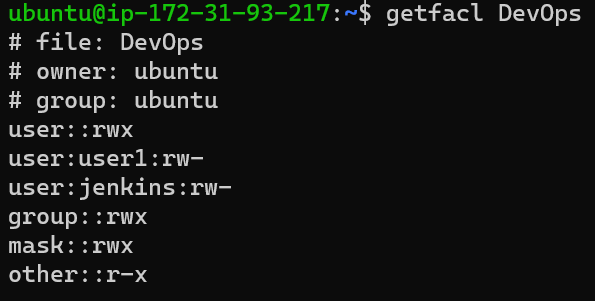
Using getfacl:
The getfacl command is used to display the current ACL settings of a file or directory.
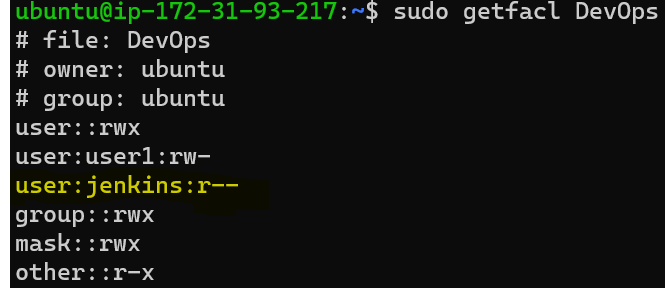
setfacl command to modify ACLs of file
The -m option modifies the current ACL of a file or directory. For example, to give read permission to jenkins user:
In simple terms, numeric modes are straightforward but lack the ability to finely customize permissions for specific users and groups. ACLs offer more control and are well-suited for complex environments with diverse access requirements. So, while numeric modes are suitable for simple setups, ACLs shine when you need to manage permissions more granularly and flexibly.
With the power to grant or restrict access, Linux bestows upon its users the responsibility to safeguard the digital landscapes they create. So, let these permissions be more than just strings of characters – let them be a shield of integrity and a testament to the art of digital guardianship.


